Day 03
Wednesday 27/05
Locations: Dundalk and UK, Northern Ireland
Summary
- 09:00-09:30 Participants meetinga, Walk-in & coffee at Creative Spark Fab Lab
- 09:30-13:00 E-textiles & Wearables Lecture and Workshop
- 13:00-14:00 Lunch
- 14:00-15:00 Bus to Northern Ireland (UK)
- 15:00-18:00 Workshop Seaweed Harvesting and food tasting
- 18:00-19:30 Social Dinner
- 19:30-21:30 Bus back to Dundalk
The bus with participants will depart after lunch from the Fab Lab in Dundalk, reaching around 3pm the coast of Northern Ireland, Crawford Rock in the UK.
Activities
- E-textiles Introduction
The lecture by Jessica Stanley introduces the participants to e-textile hands-on activities, by providing them an overview about novel materials, electronics and programming. The presentation will highlight several projects on the topic of tech & crafts and the following hands-on workshop will focus on DIY electronics, conductive and resistive materials to craft soft sensors and circuits.
- Hands-on: E-textiles & Wearables Workshop
Supported by Fabricademy team and Lab staff, participants will learn how to design and craft their own soft circuits and sensors, experimenting with conductive fabrics, threads, resistive materials, input and output components.
- Seaweed Harvesting and food tasting
Participants will explore the rich coastal ecosystems of Northern Ireland, learning how to identify different types of seaweeds. Participants will join local seaweed farm owners in harvesting seaweed, gaining hands-on experience with safe and environmentally responsible harvesting practices. They will learn how seaweed is processed for food and wellness applications, with demonstrations of drying, cleaning and basic preparation techniques. In addition, participants will enjoy a shared food tasting, highlighting local flavors and seasonal ingredients, offering a broader sensory experience connected to the coastal environment.
The dinner is included in the bootcamp fee
Electronics Materials
- Velostat
- Copper tape / fabric
- Neopixels
- Karl grimm thread (or any solderable thread)
- Needle / regular thread
- Transistors
- Resistances kit
- Jumper wires
- Protoboard
- Arduino Gemma / Circuit Playground
- Fabri Xiao Seeed Studio
- Conductive fabrics
- Conductive thread
- Resistive fabrics
Tools/Software
- Soldering iron
- Electronics equipment
- Arduino IDE
- Laser cutter C02 / 3D Printer / CNC milling machine
- Adobe Illustrator
- Rhinoceros & Grasshopper for Windows and Mac
- Fusion 360
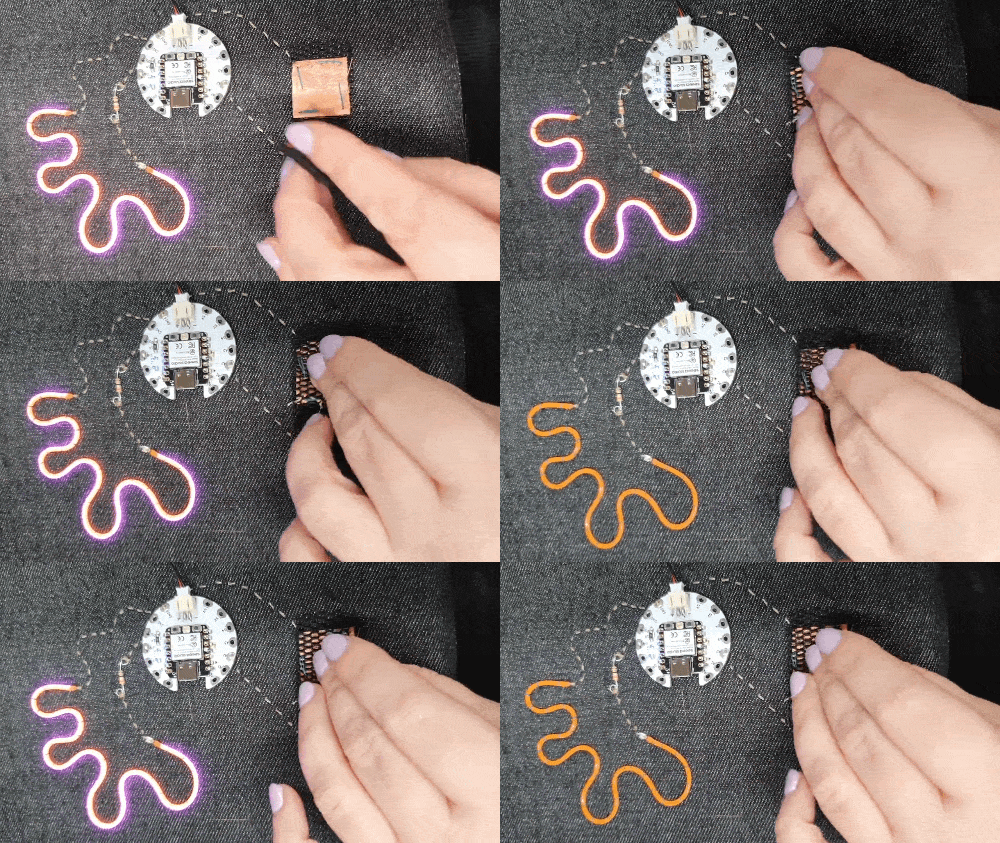
FabriXiao Soft Circuit

Code - FabriXiao Arduino
//Fabricademy Bootcamp 2026 at Creative Spark Dundalk
//E-Textiles workshop, 27th May
//
//Connect a soft switch between pin A2 (aka D2) and GND on a Fabrixiao board with a Seeed Studio XIAO ESP32C3 microcontroller
//Connect an LED 'noodle' or any kind of LED and a resistor between pin D6 and GND
//The resistor value depends on what kind of LED you're using, but 330 Ohms will work for most
//
//Fabrixiao documentation: https://fabacademy.org/2020/labs/leon/students/adrian-torres/fabrixiao.html
//Documentation on LED noodles: https://learn.adafruit.com/noods-uberguide/overview
//
//When powered on, or rebooted, the LED noodle lights up, whether or not the switch is included in the circuit.
//Pressing the switch will toggle it off and on again
//After 60 seconds of inactivity, the board will go into 'deep sleep', switching off the LED noodle and the onboard (blue) LED
//Pressing the reset (R) button reboots the board, waking it up from deep sleep.
//
//Adapted by Jessica Stanley to add the sleep mode, from code from a Fab26 workshop by Anastasia Pistofidou and Adrian Torres.

#include "esp_sleep.h" //Sleep modes library to enable the board to go to sleep

const int sensePin = D2; //We attach a soft switch to this pin
const int ledPin = D6; //Attach an LED 'noodle' or other LED to this pin, in series with a resistors
const int statusLED = D10; //Onboard LED on the Fabrixiao

bool ledState = true;  // start with the LED on

unsigned long lastActivityTime; //Checking how long it has been since the last button press
const unsigned long sleepDelay = 60000; //Go to sleep after 60 seconds

unsigned long lastPressTime = 0; //Checking when the button was last pressed, for debouncing
const unsigned long minPressGap = 300; // Time in ms to wait between registering button presses

void setup() {
  pinMode(ledPin, OUTPUT);
  pinMode(statusLED, OUTPUT);
  pinMode(sensePin, INPUT_PULLUP); //Activate the built-in pullup resistor to avoid floating input

  digitalWrite(ledPin, ledState); //Turn the LED strip on
  digitalWrite(statusLED, HIGH); //Turn the onboard LED on

  delay(200);  // allow input to settle

  lastActivityTime = millis(); //Log the current time
}

// --- Debouncing: avoiding registering one button press as multiple ---
bool buttonPressed() {
  if (digitalRead(sensePin) == LOW) {
    delay(80);  // longer debounce
    if (digitalRead(sensePin) == LOW) { //if the button is currently being pressed

      // prevent rapid retriggers
      if (millis() - lastPressTime < minPressGap) return false;

      while (digitalRead(sensePin) == LOW); // wait for the switch to be released

      lastPressTime = millis(); //update the last time since the button was pressed
      return true;
    }
  }
  return false;
}

void loop() {

//Toggle the LED if a new button press is registered
//You could update this part to
  if (buttonPressed()) {
    ledState = !ledState;
    digitalWrite(ledPin, ledState);

    lastActivityTime = millis();
  }

//Send the board into deep sleep if 60s has elapsed
  if (millis() - lastActivityTime > sleepDelay) {

//Flicker the LED strip three times to indicate that sleep mode is starting
    for (int i = 0; i < 3; i++) {
      digitalWrite(ledPin, HIGH);
      delay(100);
      digitalWrite(ledPin, LOW);
      delay(100);
    }

    esp_deep_sleep_start(); //start deep sleep!
  }

  delay(2);
}
Recommendations
Suggested to bring with you:
- Notebook and personal computer with Rhinoceros/Grasshopper and Fusion already installed
- Materials (leather, fabrics..) you want to try and that you are working with to experiment